WRONG BUS
When loading students on your bus, there are times when certain students scanning on triggers a WRONG BUS alert. This alert is a crucial feature to ensure students only load onto their assigned bus.
Let's look at what to do when you receive a wrong bus alert:

WRONG BUS CRITERIA:
students loading with a SMART tag
You will get a WRONG BUS alert when a student attempts to board your bus but does not attend the school associated with your route.
Inbound Route (home to school)
You will get a WRONG BUS alert anytime a student attempts to board your bus and is not listed on your roster.
Outbound Route (school to home)
TAP STUDENT NAME TO LOAD
COMPLETE!
students loading with a SMART tag
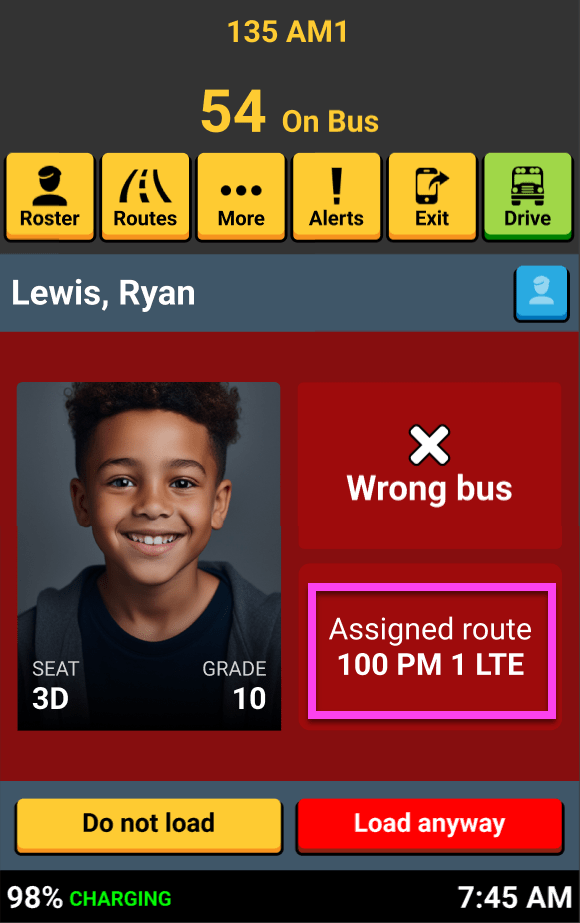
The WRONG BUS alert is shown as the student scans their card. The screen displays the assigned bus or route (district configurable) for this student so you can direct them to the correct bus
Direct student to the correct bus.
how to handle wrong bus Alerts...
TAP STUDENT NAME TO LOAD
COMPLETE!
students loading with a SMART tag
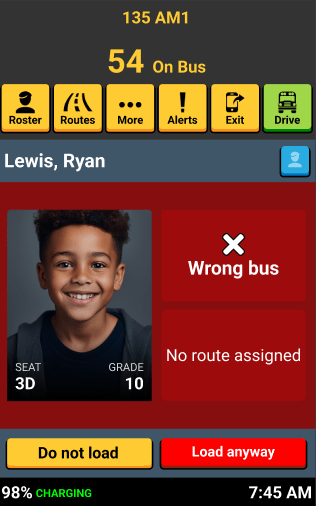
This example is an inbound route. The student boarded the bus, and the screen displays the WRONG BUS alert with "No route assigned".
This student has not been assigned to ANY inbound routes. Tap "Load anyway" or "Do not load" following your district process.
Student not assigned to any routes

That's it!
Head back to the tutorials page to learn more about using SMART tag™.